Quick start
Two minutes from install to "I just inspected my first webhook."
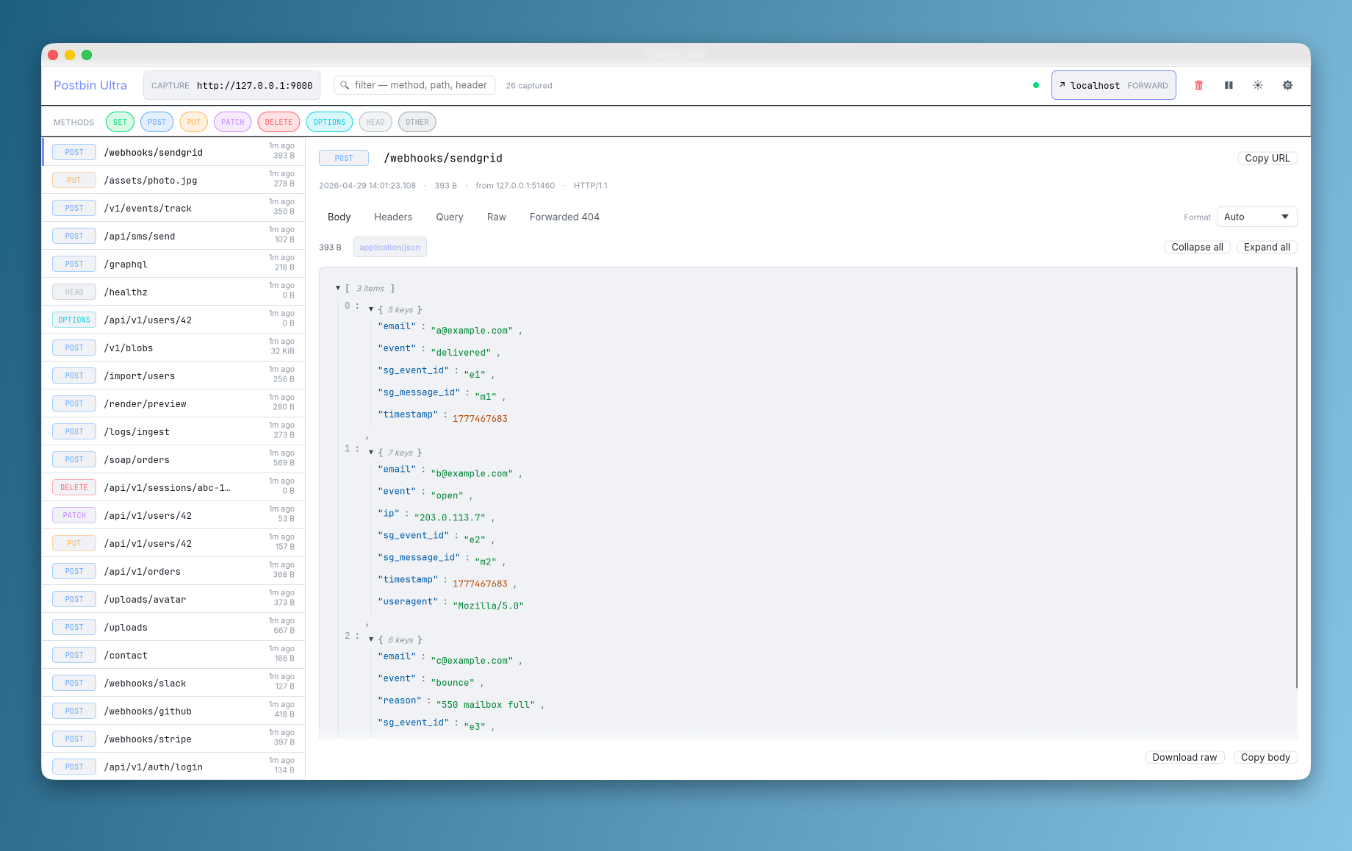
#1. Launch the app
After installing, open Postbin Ultra. The top bar shows the capture URL — click the pill to copy it.
Postbin Ultra
  Capture  http://127.0.0.1:9000     ●  ↗ off  FORWARD    🗑 ⏸ 🌙 ⚙
The default port is 9000. Pick any port you want via Settings → Capture → Port.
#2. Send a request
In another terminal, fire anything HTTP at the capture URL:
curl -X POST http://127.0.0.1:9000/webhook/test \
  -H 'content-type: application/json' \
  -d '{"event":"user.created","user":{"id":42,"email":"matt@example.com"}}'
It lands in the sidebar instantly — POST /webhook/test now 84 B.
#3. Inspect it
Click the row. Five tabs across the top:
| Tab | What you see |
|---|---|
| Body | JSON tree (collapsible), syntax-highlighted XML / HTML, decoded form-urlencoded, hex view for binary. Expand all / Collapse all in one click. |
| Headers | All headers as a grid, accent-coloured keys, monospace values. |
| Query | Decoded query string as a key/value table. |
| Raw | Full HTTP request — request line, headers, body, in one selectable text block. |
| Forwarded | (Only when forward is on or you've clicked Replay) — upstream response with status pill, headers, body, attempt history. |
#4. Filter the list
- Type in the Filter field at the top to match path, method, header, or query
- Click any METHOD chip below the top bar to toggle that method off — chip dims, those rows disappear from the sidebar
- Click again to bring them back. Reset restores all chips to on
#5. Try the sample-requests script
Postbin Ultra ships with scripts/sample-requests.sh — fires 25 realistic requests at the running app for you to play with:
./scripts/sample-requests.sh           # default port 9000
./scripts/sample-requests.sh -p 7777   # custom port
./scripts/sample-requests.sh -n 100    # repeat until you have 100 captures
You'll see Stripe webhooks, GitHub push events, Slack URL verifications, multipart uploads with images, SOAP XML, GraphQL queries, raw JPEG PUTs, OPTIONS preflights, and more. Each one lands in the sidebar.
#6. Set up forward (optional)
Want to capture and relay to a real upstream? Click the Forward pill in the top bar to open Settings → Forward, set an Upstream URL, tick Forward each captured request upstream, save.
Now every captured request is also sent to your upstream, the response is stored alongside the request, and the Forwarded tab shows what came back. Click Replay to fire any captured request again — replays land in the attempt history table on that same tab.
Full guide: Forward + replay.
#Keyboard shortcuts
| Key | Action |
|---|---|
j / ↓ |
Next request in list |
k / ↑ |
Previous request in list |
g |
Jump to most recent (top of list) |
1 / 2 / 3 / 4 |
Body / Headers / Query / Raw tab |
p |
Pause / resume capture |
t |
Cycle theme: System → Dark → Light |
Shift+X |
Clear all captures |
, |
Open Settings |
#Next
- Forward + replay — proxy mode, attempt history, the Replay button
- Configuration — every Settings tab + field
- Use cases — webhook debugging, SDK inspection, replay-against-staging workflows