Capture every request. Inspect it like a native.
Postbin Ultra is a native desktop app that catches every HTTP request landing on a port on your machine and renders it the way you actually want to read it — JSON tree view with collapse/expand, syntax-highlighted XML and HTML, forward proxy with one-click replay, attempt history. No accounts, no tunnels, no data leaving your laptop.
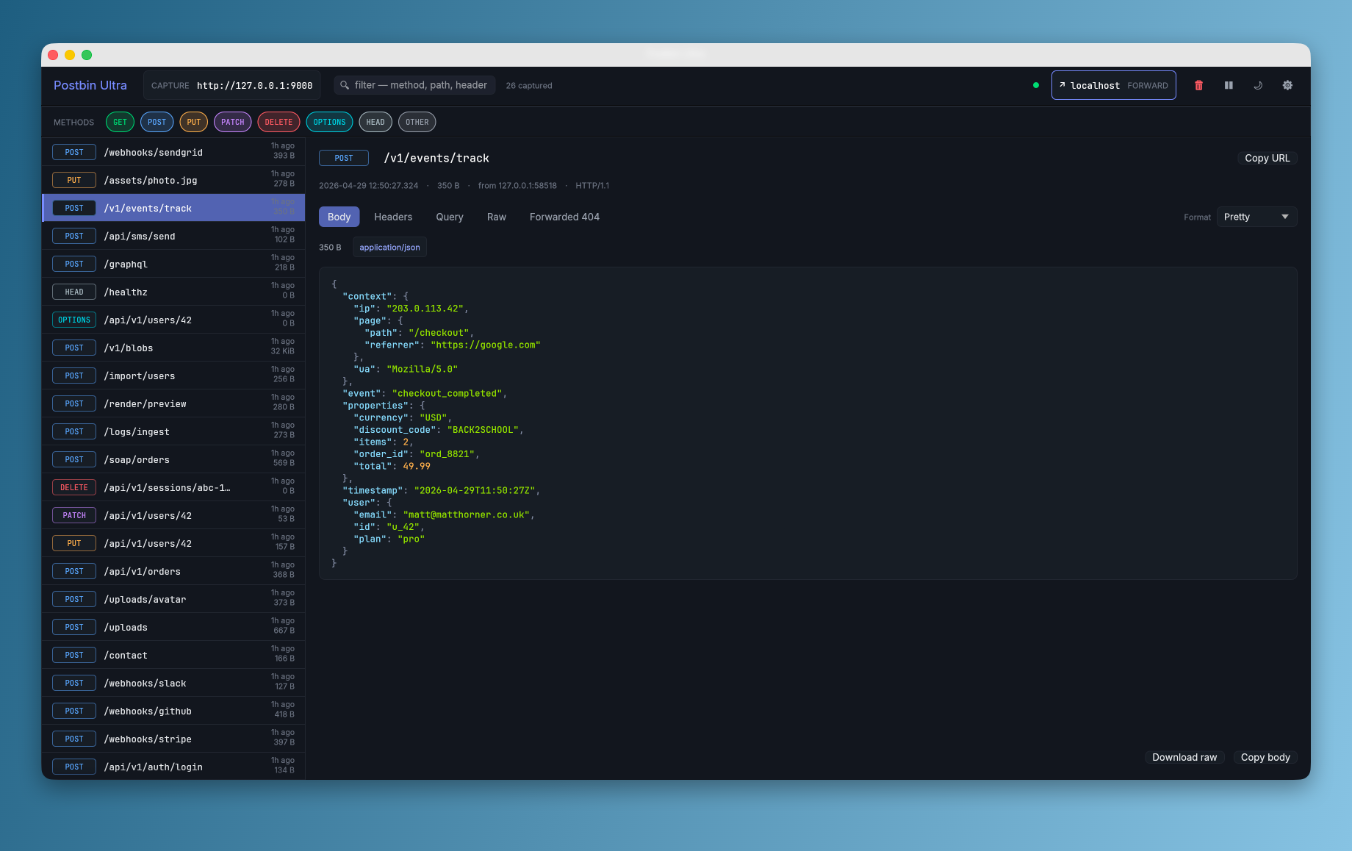
The local-first alternative to webhook.site.
Most request inspectors are SaaS tools — sign up, get a random URL, copy it into the system you're debugging, wait for traffic to round-trip through someone else's cloud. Postbin Ultra is a native app that does the same job on localhost, with stronger formatting, no accounts, no rate limits, and no data leaving your machine. Every captured request lives in a bounded ring buffer in RAM and disappears when you close the app.
Real-time
Captures arrive instantly in the sidebar. Click any row to inspect headers, query, body, and the forwarded response.
Any method, any path
Catch-all router. GET POST PUT PATCH DELETE OPTIONS + custom verbs on any URL.
Forward + replay
Turn Postbin into a transparent proxy with one click. Every forwarded request stores the upstream response. Click "Replay" to fire it again — every attempt lands in an attempt-history table.
JSON tree view
Collapsible objects and arrays, syntax-highlighted JSON / XML / HTML, hex view for binary, decoded form-urlencoded, multipart-aware. Expand all / Collapse all in one click.
Replay history
Re-fire any captured request through the current forward target. The new attempt lands in a table; click any row to compare 200 → 500 → 200 over time.
Method-chip filter
Toggle GET / POST / PUT / PATCH / DELETE / OPTIONS / HEAD / OTHER chips alongside a free-text filter. See only the requests that matter right now.
Open it. Send a request. See it.
No setup. Default capture port is 127.0.0.1:9000. Click the capture pill in the top bar to copy the URL.
Open it
The capture URL is shown in the top bar. Click to copy.
Postbin Ultra v2.0.0
  Capture  http://127.0.0.1:9000
  Forward  not set
Send a request
Anything HTTP works. Webhooks, SDKs, scripts, browsers.
$ curl -X POST http://127.0.0.1:9000/webhook \
  -H 'content-type: application/json' \
  -d '{"event":"user.created"}'
Inspect it
Click the row in the sidebar. Body / Headers / Query / Raw / Forwarded tabs are all one keystroke away.
POST /webhook 45 B now
Use cases.
Webhook debugging
Stripe, GitHub, Shopify, Slack, Twilio, SendGrid. See exactly what they send, formatted.
SDK inspection
Find out what an HTTP client or generated SDK actually puts on the wire.
Reverse-engineering
Point a third-party integration at Postbin and decode the protocol from the captures.
Forward to a real upstream
Capture and relay to staging in one step. The Forwarded tab shows the upstream response so you can debug both sides at once.
Replay until it works
Hit Replay to re-fire a captured request through the current forward target. Each attempt lands in the history table — compare 500 → 200 across deploys.
Learning HTTP
Headers, query strings, multipart, content encodings, all rendered in a way you can actually read.
One line. macOS + Linux.
The script detects your OS and arch, grabs the matching release artefact, and drops Postbin Ultra in the right place. No accounts. No telemetry. No tunnels.
curl -sSL https://raw.githubusercontent.com/MPJHorner/PostbinUltra/main/scripts/install.sh | bash
After install, launch from Spotlight (macOS) or run PostbinUltra (Linux). Done.
Prefer to grab the package by hand? .dmg for macOS, .tar.gz for Linux, .zip for Windows, or cargo install --git github.com/MPJHorner/PostbinUltra postbin-ultra-desktop.
Read the docs.
Forward setup, attempt history, every settings tab, every keyboard shortcut. Always in sync with the latest release.