Forward + replay
Forward turns Postbin Ultra into a transparent man-in-the-middle: every captured request is also sent to whatever upstream URL you configure, and the upstream's response is shown alongside the request. Replay re-fires any captured request through the current forward target so you can compare outcomes across deploys, debug intermittent failures, or build up a history of attempts on a single payload.
#Setup
Click the Forward pill in the top bar (or , to open Settings, then the Forward tab):
| Field | What it does |
|---|---|
| Forward each captured request upstream | Master toggle. Off ⇒ no forwarding happens, replay still works on demand. |
| Upstream URL | Where to send. Path and query from the captured request are appended to this base. |
| Timeout | Per-request upstream timeout in seconds. Default 30. |
| Skip TLS verification (dev only) | Accept self-signed / invalid certs. Don't ship this on. |
Click Save. The Forward pill in the top bar now shows the upstream host name in accent — ↗ api.example.com.
#Toggling without leaving the main view
Shift-click the Forward pill to flip the master toggle off / on without opening Settings. Useful when you want to record-only for a few minutes.
#What happens to a forwarded request
- Postbin captures the request (method, path, query, headers, body).
- Postbin sends the request to the upstream URL with the same method, the captured path appended to the upstream base, the same query, and the same body.
- Postbin reads the upstream response — status, headers, body — and stores it on the captured request.
- Postbin returns the upstream's status, headers, and body back to the original client.
The original client sees whatever the upstream said. Postbin is invisible in between.
#Path composition
| Upstream URL | Captured request | Forwarded to |
|---|---|---|
https://api.example.com |
POST /webhooks/stripe?id=evt_1 |
POST https://api.example.com/webhooks/stripe?id=evt_1 |
https://api.example.com/v2 |
POST /webhooks/stripe?id=evt_1 |
POST https://api.example.com/v2/webhooks/stripe?id=evt_1 |
https://api.example.com/v2/ |
(same) | (same — trailing / is trimmed so we never double up) |
#Headers
The captured request's headers are passed through verbatim except for hop-by-hop headers (connection, keep-alive, proxy-authenticate, proxy-authorization, te, trailers, transfer-encoding, upgrade, host, content-length). host is set by the upstream URL; content-length by the body. Postbin adds x-forwarded-for, x-forwarded-host, and x-forwarded-proto so your upstream can tell where the request originally came from.
The upstream response's hop-by-hop headers are stripped on the way back too.
#The Forwarded tab
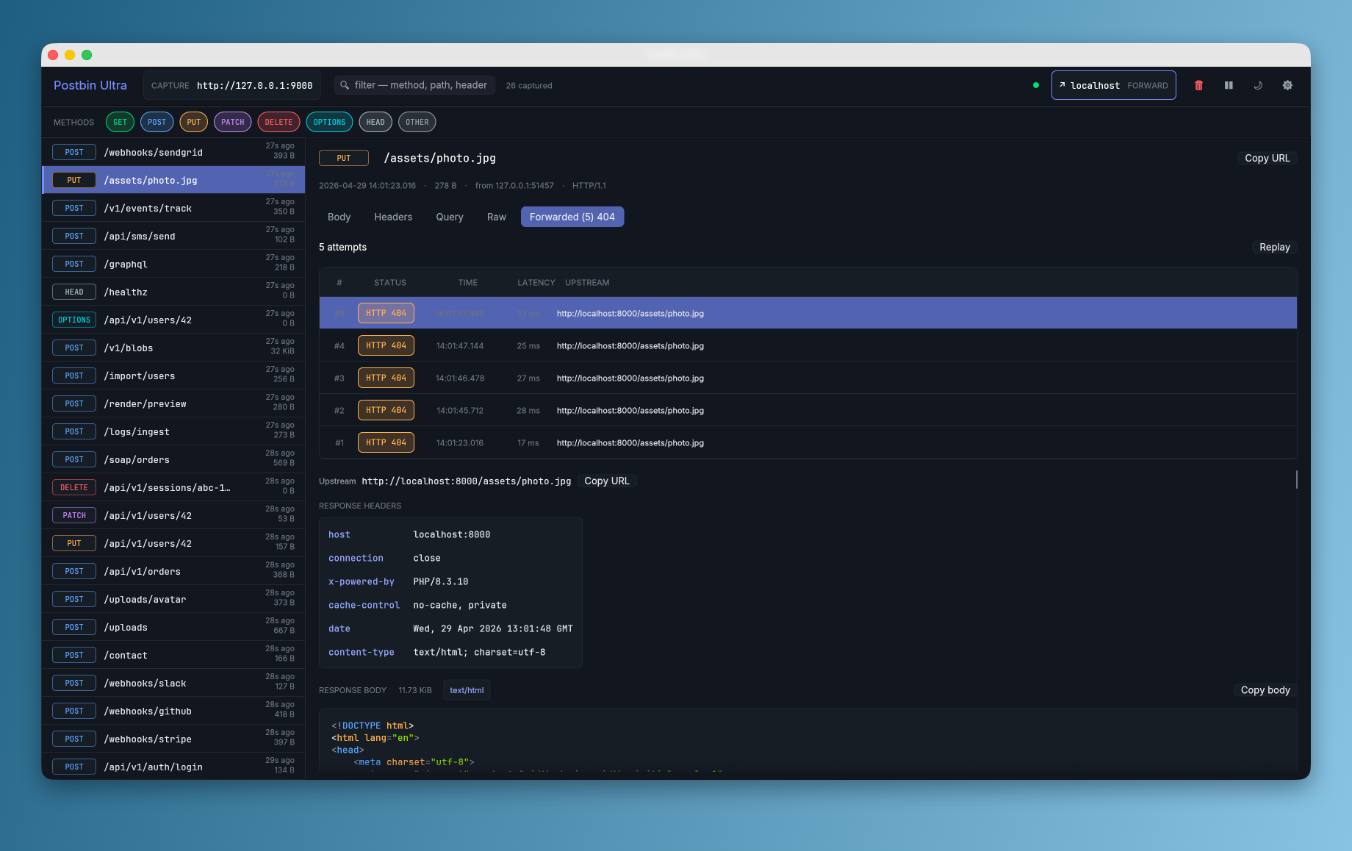
When a captured request has been forwarded (or replayed) at least once, a Forwarded tab appears next to Body / Headers / Query / Raw. Tab label includes the most recent status — Forwarded 200, Forwarded 500, Forwarded skip, Forwarded err — and the count of attempts when more than one — Forwarded (3) 200.
The tab is split into:
#Top: action row + attempts table
3 attempts                                   [ Follow latest ] [ Replay ]

#    STATUS    TIME            LATENCY   UPSTREAM
#3   HTTP 200  12:32:24.288    142 ms    https://api.example.com/webhook…
#2   HTTP 500  12:32:14.108     89 ms    https://api.example.com/webhook…
#1 HTTP 200 12:32:01.477 137 ms https://api.example.com/webhook…- The newest attempt is on top
- Click any row to pin its detail in the panel below
- Follow latest un-pins, so future replays auto-jump to the newest row
- Replay re-fires the captured request through the current forward target — a new row lands at the top with a brief accent flash
#Below: detail of the selected attempt
- Upstream URL with Copy URL button
- RESPONSE HEADERS — accent-coloured keys, monospace values
- RESPONSE BODY — same renderer as the request body (JSON tree, syntax highlight, hex for binary, copy button)
#Replay
Replay re-fires the captured request with whatever the current forward target is. The captured request itself doesn't change — only a new attempt is appended.
Common workflow:
- Capture a real production webhook in Postbin Ultra
- Set the Forward target to your local dev server
- Click Replay — the dev server gets the same payload, you see its response
- Fix the dev server, click Replay again — compare attempt #1 (500) with attempt #2 (200) side-by-side in the table
#What gets replayed
- Same method, path, query, headers (minus hop-by-hop), body, content-type
- Through whatever forward target is configured right now, not what was configured at capture time
So you can:
- Capture against
staging.api.example.com, then point Forward atlocalhost:3000and replay to test locally - Capture without forward, then enable it and replay all captured requests through the upstream
- Replay the same request against several different upstreams by changing the Forward URL between clicks
#Skipped + Error outcomes
Not every attempt produces a response:
- Skipped (yellow pill): the captured body was truncated by
max_body_size— Postbin refuses to forward a partial body to avoid corrupting upstream's view of the request. Bump max body size in Settings → Capture if you really want to forward huge bodies. - Error (red pill): upstream was unreachable (DNS failure, connection refused, TLS handshake failed, timeout). Click into the row to see the underlying error message.
#Capture-only mode
Forward is optional. With the master toggle off, Postbin Ultra just captures — same as before — and Replay is greyed out (it would have nowhere to send). Toggle on, set a URL, hit Replay → the dormant captures spring to life.
#Hot-reload
Editing the Forward URL or toggling enabled mid-session takes effect on the next captured request. The capture supervisor never has to restart. The shared ForwardSwitch is a RwLock<Option<ForwardConfig>>; the capture handler grabs a read lock per request, so a Settings → Save can flip the switch under live traffic.
#Next
- Configuration — every Settings tab + field
- Use cases — common workflows that lean on forward + replay
- Comparison — Postbin Ultra forward vs ngrok inspect, mitmproxy