Catch every email. Right inside a real Mac app.
MailBox Ultra is a native macOS application that runs a real SMTP server in-process. Point any sender at smtp://127.0.0.1:1025 and every message is parsed, stored, and rendered live in the app — HTML emails painted by the same WebKit engine Mail.app uses. No browser, no HTTP server, no Chromium, no cloud.
curl -sSL https://raw.githubusercontent.com/MPJHorner/MailboxUltra/main/scripts/install.sh | bash
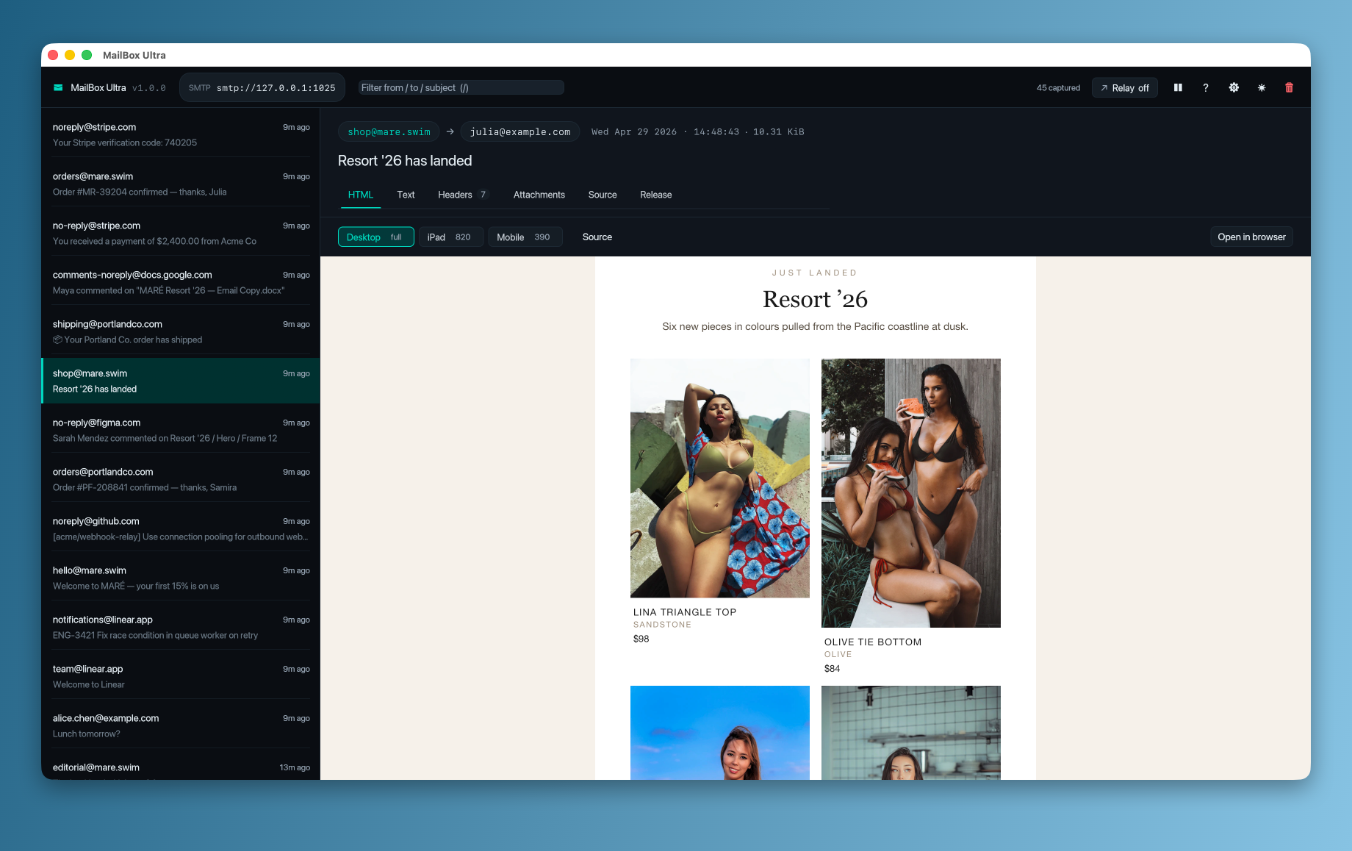
The local Mac alternative to mail-staging SaaS.
Pointing your dev environment at a real SMTP relay is overkill, and every SaaS sandbox needs an account and an internet round-trip. MailBox Ultra is a real SMTP server inside a real Mac app — capture every message your stack sends, render the HTML pixel-perfectly inside the app window, never deliver one.
Real SMTP
HELO, EHLO, MAIL FROM, RCPT TO, DATA, RSET, NOOP, QUIT, AUTH PLAIN, AUTH LOGIN. Anything that speaks RFC 5321 just works.
Native window
Real Mac dock icon, native menu bar, ⌘, for Preferences, ⌘Q to quit. Window position persists across launches.
WebKit HTML preview
Captured HTML emails render via an in-app WKWebView — same engine Mail.app uses. Desktop / iPad / Mobile width buttons swap viewport and User-Agent to faithfully preview responsive emails.
Relay mode
Optional upstream smtp:// or smtps:// URL. Capture for inspection, then forward to a real MTA. Toggle without restarting the SMTP listener.
Locked-down by default
HTML preview runs with JavaScript disabled, no remote loads through nav, link clicks intercepted and shelled to your default browser. Captured email HTML is sandboxed.
NDJSON log
Optional log file appends each captured message as one JSON object per line — never truncated. Tail it from a script or a coding agent watching alongside you.
Install. Send mail. See it.
Drop the .app into /Applications, open it. The toolbar shows the SMTP URL it bound. Send anything to 127.0.0.1:1025 and it lands in the inbox in milliseconds.
Install
Mount the universal .dmg, drag MailBox Ultra.app to /Applications.
$ open MailBoxUltra-2.0.0-universal.dmg
# drag → /Applications
# right-click → Open on first launch
Send mail
Anything SMTP works — Laravel, Django, Rails, Node, swaks.
$ swaks --to dev@example.com --from app@example.com \
  --server 127.0.0.1:1025 \
  --header "Subject: Hello"
Inspect it
HTML rendered by WebKit. Headers, attachments (with Save…), raw RFC 822 source, all on tab keys.
📥 14:23:45 app@example.com → dev@example.com Hello 140 B
Use cases.
Transactional mail
Password resets, invoices, signups. Every mailer in your app, no smtp config gymnastics.
Responsive email QA
Render an HTML email pixel-perfectly. Click Mobile (390) to see the iOS Mail layout — @media queries fire, UA is iPhone Safari.
Library inspection
Find out exactly what a Mailer SDK or queue worker writes on the wire — headers, MIME structure, encoding.
Capture-and-relay
Inspect locally, then deliver upstream with one toggle. One transaction, two outcomes.
AI-assistant pairing
NDJSON log + optional relay lets a coding agent watch live mail while you keep working in the GUI.
Onboarding flows
Reset the buffer between test runs, replay any captured signup email from the Release tab, repeat.
Install in 30 seconds.
curl -sSL https://raw.githubusercontent.com/MPJHorner/MailboxUltra/main/scripts/install.sh | bashDetects your arch, downloads the matching .dmg from the latest release, drops MailBox Ultra.app into /Applications, and clears the Gatekeeper quarantine flag. Full install guide → manual download, build-from-source, code-signing, uninstall
Read the full reference.
Every Preferences field, every relay option, every keyboard shortcut. Searchable, mobile-friendly, always in sync with the code that ships.